
Building a portfolio site should take an afternoon. Choosing the theme is what eats the week. Every free roundup reads the same — twenty-odd names, a feature bullet each, no way to tell which ones are still maintained.
Zakra is the free WordPress portfolio theme most people should start with — its 70+ starter demos get you to a live portfolio without touching a page builder. Astra suits a larger tutorial ecosystem, and Twenty Twenty-Five suits a zero budget.
We installed and tested all fifteen. Active installs, ratings, and last-updated dates came from WordPress.org as of 11 August 2026, with three-year pro upgrade costs pulled from each vendor’s own pricing page. Themes that had gone quiet didn’t make the cut.
15 Best Free WordPress Portfolio Themes & Templates for 2026
Ready to create a portfolio with the best free portfolio themes for WordPress? Explore our handpicked collection of 23 top-tier free WordPress portfolio themes for 2026.
Each theme is designed to showcase your work in style. Let’s find the perfect fit for you.
1. Zakra

Zakra is best for: getting a real portfolio live in an afternoon without more page builders.
The plugin has 30,000+ installs · 4.9 from 599 reviews · Pro $56 first year, $69 renewal, $249 lifetime, unlimited sites on every tier
Zakra’s free version ships portfolio starter demos you import whole and just swap in your own images. Its cheapest pro tier also covers unlimited sites, where Astra and Blocksy meter theirs at one.
Where Zakra loses: 30,000 installs is a rounding error next to Astra’s million, and that gap shows up as fewer third-party tutorials when you are stuck at 11pm.
Zakra is the clear starting point for a first portfolio — it does the most in its free tier of anything here, and the lifetime licence pays for itself in year four.
Key Features:
- Includes blog section
- Multiple social media icons
- User-friendly contact page
- Multiple header styles
- General, boxed, and wide layouts
Price: Free or $55/year
2. Astra

Astra is best for: importing a ready-made portfolio page in one click instead of building one from scratch.
By Brainstorm Force · 1,000,000+ installs · 4.9 from 6,501 reviews · Pro $99 first year, $149 renewal, $279 lifetime, 1 site
Astra’s free Starter Templates library includes dedicated photography and portfolio demos — full page sets with a gallery, an about page, and a contact form already built.
At $279, Astra’s lifetime licence overtakes three years of renewals during year four.
Astra is a solid choice for someone who learns by searching. Check the single-site limit on the cheapest tier before you buy.
Key Features:
- Drag and drop builder
- Easy to set colors and typography
- Compatible with Gutenberg blocks
- Requires less than 300KBs of resources
- Fully optimized for performance
Price: Free or $49/year
3. Kadence

Kadence is best for: portfolio grids inside the block editor, with no page builder underneath.
By StellarWP · 500,000+ installs · 4.9 from 451 reviews · Pro from $99/yr (Essentials)
Kadence Blocks handles galleries, masonry grids and lightboxes natively, which removes the usual portfolio tax of installing a builder just to lay out images.
Two marks against it: only 451 reviews for 500,000 installs, a thinner evidence base than most themes here. And at $99, Essentials is the priciest entry tier on this list, with no lifetime option.
Kadence is worth considering if you already build in blocks and treat the $99 as the cost of never learning a page builder.
Key Features:
- Seamless WooCommerce integration
- Numerous customization options
- Provides access to millions of illustrations, icons, and photos
- Gutenberg ready
- Beginner and developer-friendly theme
Price: Free or $31/year
4. Blocksy

Blocksy is best for: a filterable portfolio gallery you can import in one click and restyle without touching code.
By Creative Themes · 300,000+ installs · 5.0 from 870 reviews · Pro $69/yr, $199 lifetime, 1 site
Blocksy’s free portfolio starter site ships filterable galleries and animation effects out of the box, and its header/footer builder — usually a paid feature elsewhere — is free.
Blocksy’s $199 lifetime licence undercuts three years of renewals ($207) — the only theme here where lifetime wins before year three.
Blocksy suits a portfolio you intend to keep for five years, and the arithmetic says buy the lifetime on day one.
Key Features:
- Scroll to the top arrow available for easy navigation
- Header styles for every device
- Options for archive pages
- Several button styling options
- Allows to add video headers
Price: Free or $59/year
5. Customify

Customify ships five dedicated portfolio layouts out of the box — classic, boxed, multi-column, masonry, and timeline — so you pick a presentation instead of building one.
It’s also compatible with Elementor, Beaver Builder, and Divi if you want to customize further.
Key Features:
- Responsive, retina-ready and mobile-friendly
- WYSIWYG header and footer builder
- User-friendly options
- WooCommerce compatible
- SEO optimized design
Price: Free or $59/year
6. GeneratePress
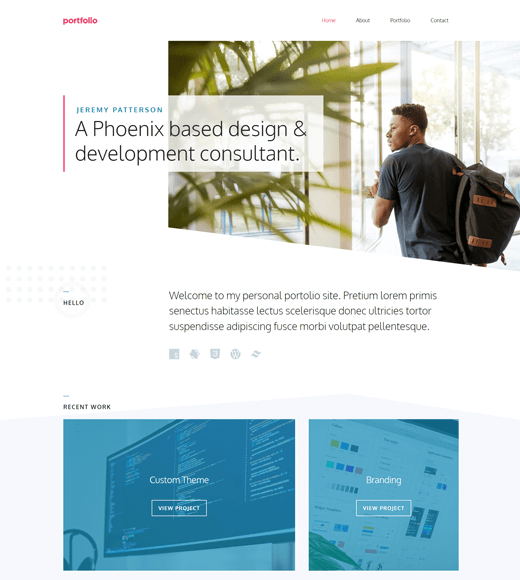
GeneratePress‘s Artist starter site is built specifically for creative portfolios — large, gallery-style image displays with the layout already done for you.
The core theme itself stays fast and minimal (under 10kb gzipped), so an image-heavy portfolio doesn’t drag your load time down with it.
Key Features:
- Uses valid HTML/CSS
- Translated into more than 25 languages
- Powerful dynamic typography
- 9 widget areas
- 5 sidebar layouts
Price: Free or $59/year
7. Phlox

Phlox ships with pre-built portfolio demos and gallery tools already configured, not just a generic multipurpose layout with a portfolio label.
Its one-click importer sets up a full portfolio site in minutes, so you’re editing content on day one instead of building layout.
Key Features:
- Advanced image preloading
- Clean and easy-to-read typography
- 30+ exclusive widgets
- Custom layouts for galleries and portfolios
- SEO-ready and GDPR compliant
Price: Free or $39/year
8. Minimal Portfolio

Minimal Portfolio does exactly what its name says: a clean portfolio grid with hover animation and easy categorization, built on Bootstrap 4.
It’s fully responsive with RTL support and a few home page layout options, but the grid itself is the reason to pick it.
Key Features:
- Minimalist website layouts and user interface
- Mobile friendly as well as cross-browser support
- Fully responsive website design
- Tons of nifty hover, parallax, and animation effects
- Completely blog friendly
Price: Free
9. Neve

Neve‘s starter site library runs to 100+ templates, several built around portfolios and creative work, and every one imports in one click.
It’s also one of the fastest themes on this list, which matters more here than usual — a slow-loading image grid undercuts the work it’s showing.
Key Features:
- 100+ ready-to-import starter sites
- Custom background
- Once-click update
- Translation and RTL ready
- Adobe Typekit fonts
Price: Free or $69/year
10. Kubio

Kubio is built with personal portfolios specifically in mind, alongside small business sites, with 340+ pre-made section blocks to assemble a layout from.
Its Kubio Page Builder extends the block editor with extra styling controls, so you’re not limited to default WordPress block options.
Key Features:
- Customizable header options
- Personalized logo integration
- Structured grid layout for content display
- Engaging threaded comment system
- Versatile two-column layout options
Price: Free
11. Qi Theme

Qi Theme‘s strength is project-level detail: 12 different single-project templates and custom navigation styles for browsing between related work.
That said, it hasn’t shipped a release since June 2024 — check WordPress.org’s compatibility notice before committing to it long-term.
Key Features:
- 10 item hover styles for lists
- 12 different single project templates
- SVG (Scalable Vector Graphics) support
- Custom CSS web fonts
- Endless typography option
Price: Free or $79/year
12. Perfect Portfolio

Perfect Portfolio is built for freelancers and agencies specifically, with a one-click demo import to get a portfolio site live fast.
It includes a dedicated Services section and a CTA block for contact — the two things a freelancer’s site needs beyond just a gallery.
Key Features:
- Built-in Live Customizer
- Portfolio and Author Showcase Section
- Schema Friendly
- Social Media Integration
- Swift Support
Price: Free or $59/year
13. Ultra

Ultra pairs with SiteOrigin’s drag-and-drop builder to lay out a portfolio without code, and its one-click demo import gets you a full site to edit rather than a blank page.
It’s the most generic theme on this list — fine if you want a portfolio and a business site sharing one layout, less so if portfolio is all you need.
Key Features
- Integrates SiteOrigin’s page builder plugin
- Meta slider for full-width sliders
- Supports plugins like Jetpack, Contact Form 7
- Custom logo
- Auto updates
Price: Free or $5+/year
14. Vcard CV Resume

Vcard CV Resume is built for a specific portfolio format: personal CV, resume, or business Vcard, not a general-purpose gallery.
It’s Bootstrap-based, so it loads fast, and ships with shortcodes for adding CTA buttons and other elements without editing code.
Key Features:
- Professional design
- Handy left/right sidebar
- Stunning animations and CSS effect
- SEO optimized codes
- WooCommerce compatible
Price: Free or $40/year
15. Multipurpose Portfolio

Multipurpose Portfolio covers a wider range of portfolio formats than most here — VCard, CV, and social profile layouts alongside a standard gallery.
It’s Bootstrap-based with several home page layout options, and translation-ready if your audience isn’t only English-speaking.
Key Features:
- Allows to add social media links
- Four sliders available
- Secured and optimized code
- Supports third-party plugins
- Compatible with the latest WordPress version
Price: Free or $39/year
Which Portfolio Theme Should You Choose?
If you are building your first portfolio and want it live this week: Zakra. Import a starter demo, replace the images, publish. The lifetime licence at $249 is worth it only if you are certain about the site.
If you would rather look up an answer than work one out: Astra. A million installs and 6,501 reviews mean your problem is already solved in a forum thread somewhere.
If your portfolio also sells something: Kadence. Its block editor handles galleries and WooCommerce natively, without a separate builder plugin.
If your budget is zero and it is staying zero: Twenty Twenty-Five. No locked features, no upgrade prompts, maintained by WordPress itself.
If you are still undecided, start with Zakra. It gives you the most to work with before spending anything, and if it turns out to be wrong, switching a portfolio theme costs you a weekend rather than a rebuild – your projects live in posts and pages, not in the theme.
What a Portfolio Site Needs That No Theme Gives You
A theme decides how your work is framed. It does not decide whether anyone hires you. Three things sit outside it.
Your images are the performance budget, not the theme. A 4MB PNG will slow a portfolio built on GeneratePress just as badly as one built on anything else. Export at the size you actually display, serve WebP, and let the browser lazy-load below the fold.
Contact details belong above the fold, not on a contact page. The person deciding whether to hire you is on your homepage for under a minute. An email address in the header outperforms a form two clicks away.
Every project needs a sentence of context. A grid of images tells a client what you can make. One line of “who this was for, what the constraint was, what changed” tells them what you are like to work with. That line is what a theme cannot supply and what most portfolios omit.
Frequently asked questions
Are free WordPress portfolio themes actually free?
Yes – every theme on this list is fully functional at $0 from the WordPress.org directory, and Twenty Twenty-Five has no paid tier at all. The rest are freemium: the free version works, and specific features sit behind an upgrade costing $125 to $347 over three years. Nothing here expires or stops working if you never pay.
Do I need a page builder to make a portfolio in WordPress?
No, not any more. Kadence, Blocksy and Twenty Twenty-Five all handle portfolio grids and galleries in the block editor natively. A page builder is worth it if you want pixel-level control over a custom layout, and unnecessary if you are arranging images in a grid.
Will a free theme slow down my portfolio site?
Rarely – your images almost always will first. GeneratePress adds under 10kb gzipped to a page; a single unoptimised photograph can add 4,000kb. Compress and resize your images before you start blaming the theme.
How do I know if a free theme has been abandoned?
Open its WordPress.org page and read the “Last updated” line. Past twelve months is a compatibility risk. Past two years, WordPress.org adds its own banner saying the theme “may no longer be maintained” – treat that as final. Qi is the live example: 10,000 active installs, a listing page that looks current, and no release since 6 June 2024.
Can I change my portfolio theme later without losing my work?
Yes. Your projects, images and pages live in the WordPress database, not in the theme, so they survive a switch. What you lose is theme-specific layout: custom headers, widget placement and anything built with a theme’s own page-building tools. Budget a weekend, and switch before you have 200 projects rather than after.
Wrapping It Up!
Did you like any theme from our list of free WordPress portfolio themes? If so, you can instantly download it and start creating your portfolio.
All these themes are well-coded and carefully designed so that you may find them easy to use. But if you find any issue, you can instantly contact the respective theme providers or ask your queries in WordPress support forums.
Free WordPress portfolio themes, such as Zakra, are good at providing instant support to their users. So, you can choose any of these best free portfolio themes for WordPress without any hesitation.
If none of these free picks feel like the perfect match, take a look at ThemeGrill’s full collection of premium and responsive WordPress themes for more design options and dedicated support
Liked what you read? Visit our blog page to read more interesting articles, such as guides on creating a WordPress website.